How to Change a Profile in an SSH™ MultiPro: Step-by-Step
Follow these step-by-step instructions on doing a profile changeover for an SSH MultiPro to get it done easily and accurately.
/Rick Zand/4 min read
If you own a New Tech Machinery (NTM) SSH™ MultiPro Roof Panel Machine and need to change a profile, this article will walk you through the process step by step. Following these instructions carefully is important to ensure a safe and successful profile change. Correct profile changes are critical for achieving precise and accurate panel fabrication.
NTM has been helping rollforming operations build their businesses for over 30 years. As leaders in the portable rollformer industry, we make it our mission to share our knowledge, so our customers get the most value out of their NTM machines.
The SSH MultiPro Tooling Changeover Process
1. Safety First
Safety is paramount when working with machinery. Always ensure the machine is properly secured before proceeding with any tooling changes. Follow these safety steps before starting:
All machine covers must be securely in place and mounted onto the machine. Keep them on whenever the machine is in use.
Never work through the shear or put any part of your hands or body underneath the shear blade. Always work in front of or behind the shear.
Ensure the machine’s main control cable is removed to prevent accidental activation.
Make sure the emergency stop (E-stop) is pushed in to disable the machine completely.
Unplug the machine and use the appropriate lockout tagout procedures for your area.
2. Remove Covers
Top covers are removed to access the tooling. In some cases, removing the side covers may be necessary for a standard tooling change. Always follow your machine’s manual.
3. Loosen A Bolts
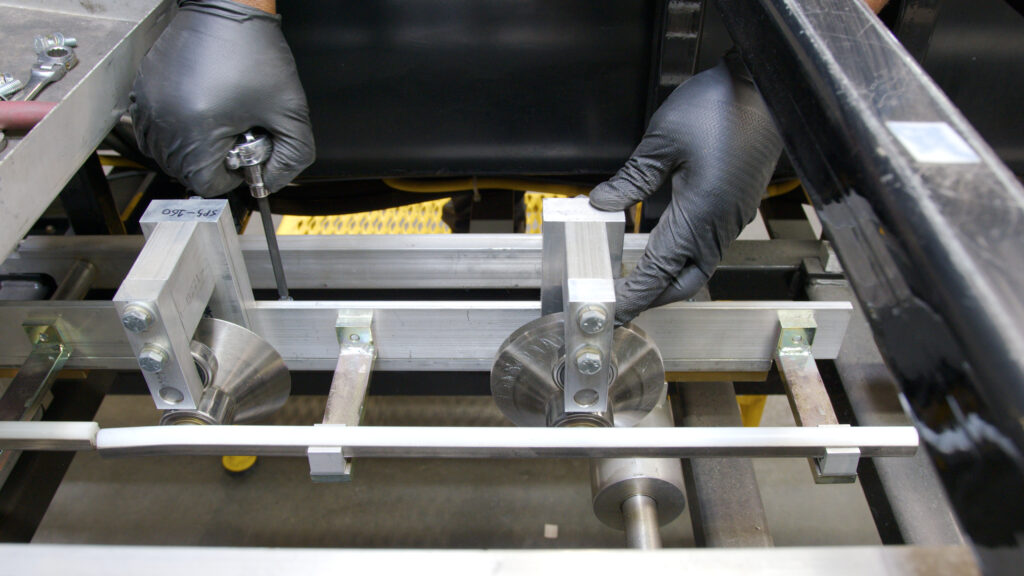
Loosen the A bolts that hold the tooling rails using a quarter-inch Allen wrench. These bolts are attached to the tooling rail, so don’t completely remove them—just loosen them while holding them in place.
4. Remove Tooling Rails
Start with the right rail (Number one) and then move to the left rail. Remove the tooling rails from entry to exit. When you store them away, ensure the rollers are not touching and can move freely without obstruction.
5. Remove Shear Dies
Before removing shear dies, make sure to remove the shear cover. Exercise extreme caution when working around the shear area as it can cause serious injury. Remember, work in front of or behind the shear, but never reach through the shear.
6. Identify and Install New Profile
Identify the profile you’re installing. Grab the appropriate rail and line it up using the locators on the profile. Simply line up the profile and tighten the bolts finger tight, but not all the way.
7. Install Tooling on Right Side
Using the proper torque, tighten the bolts on the rail. Be careful not to overtighten. Use a hand-held wrench or impact wrench set to the proper torque. Repeat this step for the other rails on the right side, following the manual’s instructions.
8. Install Tooling on Left Side
Repeat the rail installation process for the left side, starting with the L1 rail. Follow the manual’s instructions for the specific profile.
9. Entry Guide
Start with “C” dimension. Check the manual for the correct measurement for the profile you’re installing. Tighten the clamp at that position to keep the entry guide shoe from moving left to right.
Place short piece of coil and place the edge of the material so that it just touches the right shoe. To align the material with entry guide, loosen the D bolts on the clamps. Set the rail according to the correct measurement on the scale for the profile.
10. Set Dimensions
Using appropriate measurements from the manual, set dimensions and ensure the rails are parallel with the string. Tighten the D bolts to secure the rails in place.
11. Reinstall Shear Dies
Carefully reinstall the shear dyes for the roller set, ensuring safety protocols around the shear area are followed at all times.
12. Test Run
Cut a short test piece and run it through the machine to ensure alignment and cutting accuracy. Make any necessary adjustments according to the manual’s guidance.
Always prioritize safety when using machinery. If you need to make further adjustments or changes, refer to the manufacturer’s manual or their online resources.
Final Thoughts on the SSH Roof Panel Machine Tooling Changeover
Changing a profile in an SSH roof panel machine requires attention to detail, precision, and a strong focus on safety. By following this step-by-step guide and referring to your machine’s manual, you can successfully change tooling and ensure accurate panel fabrication. Remember to stay vigilant, follow safety protocols, and refer to additional resources when needed.
For more information about any of our rollforming machines, profiles, or accessories, contact us. Our machine experts are always happy to answer any questions.